Contact: zegraph @ yahoo.com Last update: June 2020

The wxWidnows library is one of the best open source libraries for developing cross-platform user interface. Its API for event handling simplifies embedding a scripting language for widget creation.
Upon startup, the widget program "zsw.exe" creates a main frame window and then executes the ZeScript file "zsw.zs". The script should first obtain the main frame and then add menubar, toolbar, or controls in it. For instance,
frame = wxframe();

a = frame.menubar("&File", "&Item-1\tCtrl-I", "_", "I&tem-2\tCtrl-t",
                  ">", "Submenu", "&Sub-1\tCtrl-S", "S&ub-2\tCtrl-u",
                  "<", "It&em-3\tCtrl-e");

b = frame.menubar("&Help", "&About\tCtrl-A");

na = size(a);
nb = size(b);
for (i = 0; i < nb; i++) a[na+i] = b[i];

frame = wxcast(frame);

frame.push("event_handler", "menu", a);

function event_handler(id)
{
    s = " " + id;
    wxmsg(s);
}
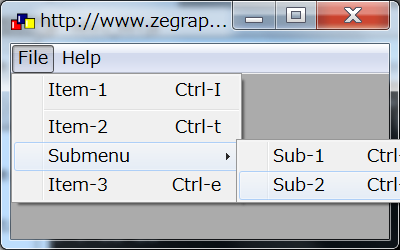
You may have noticed that in the reference the function push() is registered to the base window; therefore if we want to push a event-handling callback function to handle menu event in the main frame, we have to cast the frame from the top window type to the base window type. Here are more examples.
frame=wxframe();

win=wxcast(frame);

if (wxactive()) {
	wxmsg("I am active!");
}

[w,h]=wxsize();

wxmsg("Window size: Width="+w+" Height="+h);

[pname,fname,ename]=wxsplit("c:\\zs\\test.zs");

wxmsg("Path="+pname+" File="+fname+" Extension="+ename);

wxexec("zsw.exe");
frame=wxframe();
frame.title("My App");
frame.icon("icons/chart.ico");
frame.evth("frame_event");
frame.timer(10000);

win=wxcast(frame);

// create manu bar and add the first menu

menu_file=frame.menubar(
	"&File",
	"Load &Parameters\tCtrl-P",
	"_",
	"Set &Output\tCtrl-O",
	"_",
	"&Pick Color\tCtrl-C",
	"_",
	"&Quit\tCtrl-Q"
	);
win.push("file_handler","menu",menu_file);

// add the second menu

menu_option=frame.menubar(
	"&Option",
	"^",
	"&Check/Uncheck",
	"^",
	">",
	"&Submenu",
	"S&ub-1",
	"Su&b-2",
	"<",
	"_",
	"@",
	"&Op-1",
	"O&p-2"
	);
win.push("option_handler","menu",menu_option);

menubar=frame.menubar();
menubar.check(menu_option[0],true);

// add tool bar

tool_bar=frame.toolbar(
	"|", " ",
	"icons/param.ico", "load parameters",
	"icons/save.ico", "set output path",
	"|", " ",
	"icons/color.ico", "set color",
	"|", " ",
	"icons/font.ico", "set font"
	);
win.push("toolbar_handler","tool",tool_bar);

// create status bar

status_bar=frame.statusbar(3);
frame.statusbar(0,"Status-1");
frame.statusbar(1,"Status-2");
frame.statusbar(2,"Status-3");

/////////////////////////////////////////////////////////////////////

// handlers

function frame_event(evt)
{

	if (evt=="exit") {
		wxmsg("The app is about to exit.");
		wxmsg("Let's test full screen mode");
		frame.size(-1);
		wxmsg("and then close the app.");
		wxexit();
	}
	else if (evt=="timer") {
		wxmsg("Timer.");
	}
}

function file_handler(id)
{
	if (id==menu_file[0]) {
		file=frame.file();
		wxmsg("Parameter file: "+file);
	}
	else if (id==menu_file[1]) {
		path=frame.directory();
		wxmsg("Output path: "+path);
	}
	else if (id==menu_file[2]) {
		[r,g,b]=frame.color();
		wxmsg("Color: red="+r+" green="+g+" blue="+b);
	}
	else if (id==menu_file[3]) {
		wxexit();
	}
}

function option_handler(id)
{
//	wxmsg("Option: "+menubar.label(id));
	if (id==menu_option[0]) {
		if (menubar.check(id)) {
			menubar.check(id,false);
		}
		else {
			menubar.check(id,true);
		}
	}
	else {
		wxmsg("Enabled: "+menubar.enable(id));
	}
}

function toolbar_handler(id)
{
	// execute the same command as menu
}
// get the top frame

frame=wxframe();

// cast top frame to generic window control type

win=wxcast(frame);

// set size

win.size(800,800);

// create a panel in the top frame

panel=win.panel();
win.font(12);

// set colors

panel.fgcolor(0,0,255);
panel.bgcolor(255,255,255);

// create vertically aligned sizer

topsizer=panel.sizer("verbox");

// add some space

topsizer.add(10,30);

/*
1) create a horizontally aligned sizer in the top sizer;
2) add label and text box to the sizer.
*/

sizer=topsizer.sizer("horbox","aligncenter");

obj=panel.statictext("Static Label:",1);
sizer.add(obj,"alignright");

text=panel.textbox("text content",200,30);
sizer.add(text);

obj=panel.button("Font",90,30);
sizer.add(obj);
obj.push("font_handler","mouse");
obj.focus();

topsizer.add(10,20);

/*
1) create a horizontally aligned group sizer in the top sizer;
2) add check boxes to the sizer.
3) add combo box to the sizer.
4) add radio buttons to the sizer.
*/

panel2=panel.panel();
panel2.bgcolor(225,225,225);
topsizer.add(panel2,"aligncenter");

sizer=panel2.sizer("horstatic","Group",500,100);

obj=panel2.checkbox("check1",true);
sizer.add(10,10);
sizer.add(obj,"aligncenter");

obj=panel2.checkbox("check2",false);
sizer.add(10,10);
sizer.add(obj,"aligncenter");

obj=panel2.statictext("Items: ",1);
sizer.add(10,10);
sizer.add(obj,"aligncenter");
obj=panel2.combobox(["item1", "item2", "item3"], 1);
sizer.add(obj,"aligncenter");

topsizer.add(10,20);

// add a group of options

sizer=topsizer.sizer("horbox","aligncenter");
obj=panel.radiobox("Options","col","opt1  ","opt2  ","opt3  ","opt4  ","opt5  ");
sizer.add(obj,"aligncenter");

/*
create a grid sizer in the top sizer and add controls in it.
*/

topsizer.add(10, 20);

sizer=topsizer.sizer("flexgrid",2,5,3,5,"all|aligncenter");
obj=panel.button("button1");
obj.push("button1_handler","mouse");
sizer.add(obj,"all|aligncenter");
obj=panel.button("button2");
obj.push("button2_handler","mouse");
sizer.add(obj,"all|aligncenter");
obj=panel.button("button3");
obj.push("button3_handler","mouse");
sizer.add(obj,"all|aligncenter");
obj=panel.button("button4");
obj.push("button4_handler","mouse");
sizer.add(obj,"all|aligncenter");
obj=panel.button("button5");
obj.push("button5_handler","mouse");
sizer.add(obj,"all|aligncenter");
obj=panel.button("button6");
obj.push("button6_handler","mouse");
sizer.add(obj,"all|aligncenter");


////////////////////////////////////////////////

function font_handler(p1, p2, p3, p4, p5, p6)
{
    if (p1==1) {      // left up
		// set textbox font
		text.font();
    }
}

function button1_handler(p1, p2, p3, p4, p5, p6)
{
    if (p1==1) {      // left up
		wxmsg("Testing the cursor function.");
		win.cursor("wait");
		sleep(3000);
		win.cursor("arrow");
    }
}

function button2_handler(p1, p2, p3, p4, p5, p6)
{
    if (p1==1) {
		wxmsg("Testing the get/set functions.");
		wxmsg("Textbox content: "+text.get());
		wxmsg("Now change the content.");
		text.set("Testing the set function.");
    }
}

function button3_handler(p1, p2, p3, p4, p5, p6)
{
    if (p1==1) {
		wxmsg("Testing disable function.");
		text.disable();
    }
}

function button4_handler(p1, p2, p3, p4, p5, p6)
{
    if (p1==1) {
		wxmsg("Testing the enable function.");
		text.enable();
    }
}

function button5_handler(p1, p2, p3, p4, p5, p6)
{
    if (p1==1) {
		wxmsg("Testing the size function.");
		[w,h]=win.size();
		wxmsg("Window size: "+w+"x"+h);
		wxmsg("It will be enlarged by 10%.");
		win.size(integer(w*1.1),integer(h*1.1));
    }
}

function button6_handler(p1, p2, p3, p4, p5, p6)
{
    if (p1==1) {
		wxmsg("Do nothing.");
    }
}
g_width=900;
g_height=800;

frame=wxframe();
win=wxcast(frame);

// add a plitter

splitter=win.splitter();
splitter.min(100);
spw=wxcast(splitter);

// add a image panel

plot=spw.panel();
plot.bgcolor(255,255,255);

sizer=plot.sizer("verbox");
sizer.add(50,50);
sizer=sizer.sizer("horbox");
sizer.add(10,10);
// a transparent label
obj=plot.statictext("Items: ",1,true);
obj.fgcolor(255,255,255);
sizer.add(obj,"alignleft");
// a combo control
obj=plot.combobox(["item1", "item2", "item3"], 1);
obj.push("combo_handler","combo");
sizer.add(obj,"alignleft");

// add a notebook control

notebook=spw.notebook("top");

//arrange the two controls in the splitter

splitter.horizontal(wxcast(plot),wxcast(notebook),g_height/3);

// add a panel to the notebook for grid control
w=notebook.add("Grid",true);
grid=w.grid(20,10);
grid.label(0,"Parameter");
grid.label(1,"Value");
grid.label(2,"Remark");
grid[0,0]="Address";
grid[0,1]="00-000 Street";
grid[0,2]="Updated on Jan.01";

// add a panel for treeview control
w=notebook.add("Treeview",false);
tree=w.treeview("treeview_handler");
tree.root("root");
tree.append("/", "group1");
tree.append("/", "group2");
tree.append("/group1", "item1");
tree.append("/group1", "item2");
tree.append("/group1", "item3");
tree.append("/group2", "item1");
tree.append("/group2", "item2");
tree.append("/group2", "item3");

// push event handlers just before resizing
// so that when the functions are called
// all objects are accessible.

w=wxcast(plot);
w.push("plot_handler1","paint");
w.push("plot_handler2","size");
w=wxcast(notebook);
w.push("notebook_handler","size");

// set window size
win.size(g_width,g_height);

/////////////////////////////////////////////////////////////////////

function notebook_handler(cw, ch)
{
	cw-=10;
	ch-=40;
	w=wxcast(grid);
	w.size(cw,ch);
	w=wxcast(tree);
	w.size(cw,ch);
}

function plot_handler1(w)
{
	plot.bitmap("data/earth.png");
}

function plot_handler2(w, h)
{
	plot_handler1(null);
}

function treeview_handler(evt, item)
{
	wxmsg(evt+": "+item);
}

function combo_handler(obj)
{
	wxmsg("Item: "+obj.get());
}
frame=wxframe();

win=wxcast(frame);

// add two panels as two interfaces

panel2=win.panel();
frame.push(panel2);
panel2.bgcolor(0,0,255);

panel1=win.panel();
panel1.bgcolor(0,255,0);

// add a button to panel1

sizer=panel1.sizer("verbox");
sizer.add(50,50);
obj=panel1.button("Button-1");
obj.push("handler1","mouse");
sizer.add(obj,"aligncenter");

// add a button to panel2

sizer=panel2.sizer("verbox");
sizer.add(50,50);
obj=panel2.button("Button-2");
obj.push("handler2","mouse");
sizer.add(obj,"aligncenter");

// set window size
win.size(500,500);

/////////////////////////////////////////////////////////////////////

function handler1(p1, p2, p3, p4, p5, p6)
{
    if (p1==1) {
		frame.push(panel1);
		frame.pop(panel2);
		//trigger widget update by resizeing
		[w,h]=win.size();
		win.size(w+1,h+1);
	}
}

function handler2(p1, p2, p3, p4, p5, p6)
{
    if (p1==1) {
		frame.push(panel2);
		frame.pop(panel1);
		//trigger widget update by resizeing
		[w,h]=win.size();
		win.size(w-1,h-1);
	}
}